
What to Look For in a Transcription API
Key Takeaways
- Transcription APIs are essential for processing audio/video content in remote work and virtual meetings, improving efficiency and accuracy.
- Recall.ai’s Meeting Transcript API reduced post-meeting documentation time by over 70%, freeing teams for strategic tasks.
- Advanced APIs like Google Cloud’s Speech-to-Text adapt to accents, background noise, and multiple speakers, enhancing accuracy.
- Businesses using transcription APIs report faster turnaround times and fewer errors compared to manual transcription methods.
- Real-time transcription in platforms like Zoom ensures critical details are captured during meetings and webinars.
- These APIs enable scalable automation, handling large volumes of audio data without compromising accuracy.
- Transcription tools provide actionable insights from unstructured audio data across industries like healthcare and education.
Why Transcription APIs Matter
Transcription APIs have become essential tools for businesses and developers, transforming how audio and video content is processed, analyzed, and repurposed. As remote work and virtual meetings dominate modern workflows, the demand for accurate, scalable transcription solutions has surged. For example, platforms like Zoom and Recall.ai highlight how real-time transcription supports virtual collaboration, ensuring no critical detail is missed during meetings or webinars. These tools not only streamline communication but also enable actionable insights from unstructured audio data, making them indispensable for industries ranging from healthcare to education.
How Do Transcription APIs Improve Efficiency and Accuracy?
Transcription APIs automate tasks that were once time-consuming and error-prone. Manual transcription requires hours of human labor, while APIs powered by AI can convert speech to text in seconds. Recall.ai’s Meeting Transcript API, for instance, delivers real-time and post-call transcripts with metadata, reducing reliance on manual note-taking and minimizing transcription delays. Similarly, Google Cloud’s Speech-to-Text API use machine learning to adapt to accents, background noise, and multiple speakers, significantly improving accuracy compared to traditional methods.
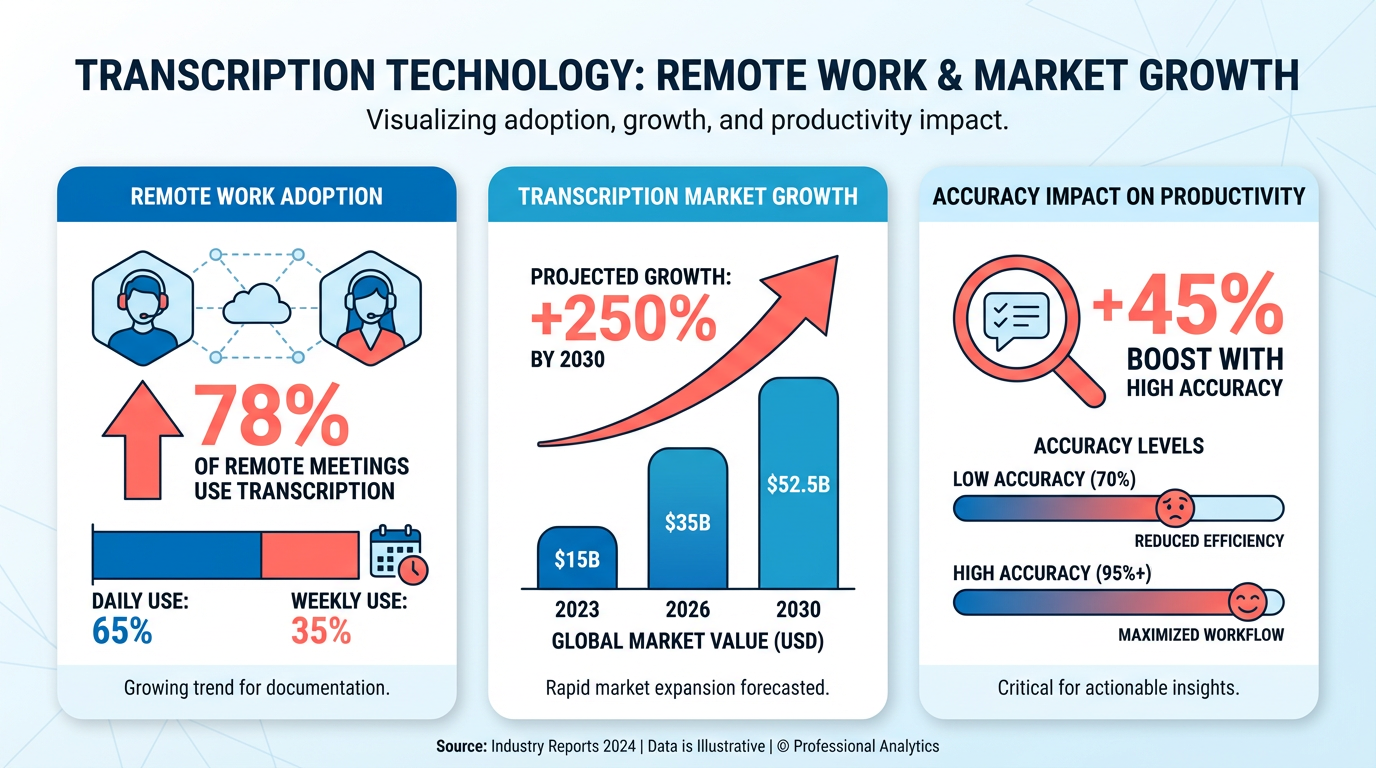
The impact is measurable: businesses using these APIs report fewer transcription errors and faster turnaround times. One company using Recall.ai’s solution reduced post-meeting documentation time by over 70%, allowing teams to focus on strategic tasks rather than administrative work. Unlike generic providers, WhisperAPI (whisper-api.com) offers transparent pricing and customizable models that align with specific use cases, avoiding the hidden costs that often accompany competitor tools. As discussed in the Evaluating Transcription API Features section, prioritizing accuracy and cost transparency ensures long-term value for users.
Who Benefits Most from Transcription APIs?
Developers, content creators, and enterprises all gain unique advantages from transcription APIs. Developers can integrate these tools via SDKs or RESTful endpoints, adding features like voice-to-text conversion or multilingual support to applications without building models from scratch. As mentioned in the Integration and Implementation section, establishing secure connections is critical for seamless API adoption. For example, the Zoom Video SDK enables developers to embed live transcription and translation into virtual events, expanding accessibility for global audiences.
Content creators rely on transcription APIs to generate closed captions for videos, repurpose audio content into blog posts, or analyze audience engagement. Google Cloud’s AI-driven transcription tools, for instance, allow YouTubers and podcasters to auto-generate timestamps and search-optimized transcripts. Meanwhile, businesses benefit from automating customer service workflows-transcribing call centers or support chats to identify pain points and improve responses.
Accessibility is another major benefit. Real-time transcription services, like those in Zoom’s SDK, empower hearing-impaired users to participate fully in meetings, webinars, and live streams. Building on concepts from the Security, Privacy, and Compliance section, these APIs also reduce the risk of data breaches by minimizing human access to sensitive audio files, a concern for healthcare providers and financial institutions. By removing communication barriers, transcription APIs align with global accessibility standards and foster inclusive environments.
What Challenges Do Transcription APIs Solve?
Manual transcription is not only slow but also prone to human error, especially in high-volume or multilingual settings. APIs address these challenges by scaling automatically and reducing labor costs. For instance, Recall.ai’s API handles hundreds of concurrent meetings, eliminating bottlenecks during peak usage periods. This scalability is critical for organizations like call centers or research institutions that process vast amounts of audio data daily.
Another hurdle is the cost of hiring transcriptionists for specialized fields, such as legal or medical transcription. APIs trained on domain-specific datasets-like WhisperAPI’s customizable models-offer precision tailored to niche industries without the need for in-house experts. Additionally, transcription APIs reduce the risk of data breaches by minimizing human access to sensitive audio files, a concern for healthcare providers and financial institutions.
By solving these issues, transcription APIs enable teams to focus on higher-value work. Whether it’s analyzing meeting insights, improving customer experiences, or complying with accessibility laws, these tools empower organizations to operate efficiently in a data-driven world.
Integration and Implementation

When integrating a transcription API like WhisperAPI (whisper-api.com), developers typically begin by establishing a secure connection using REST APIs or SDKs. This step ensures your application can send audio files and receive transcriptions. Below, you’ll find practical steps, code examples, and optimization strategies to streamline implementation..
How Do You Set Up API Authentication?
Authentication verifies your application’s identity and grants access to the transcription service. Most APIs require an API key passed via headers. For WhisperAPI (whisper-api.com), you’d include the key in the Authorization header using Bearer token format. As mentioned in the Security, Privacy, and Compliance section, secure handling of credentials is critical to prevent unauthorized access.
Here’s how to authenticate and send a transcription request in Python:
import requests

url = "https://api.whisper-api.com/transcribe"
headers = {
 "Authorization": "Bearer YOUR_API_KEY",.
 "Content-Type": "audio/wav"
}

with open("audio.wav", "rb") as audio_file:
 response = requests.post(url, headers=headers, files={"file": audio_file})
 print(response.json())
JavaScript developers can use fetch with a similar approach:
const url = "https://api.whisper-api.com/transcribe";.
const headers = {
 "Authorization": "Bearer YOUR_API_KEY",.
 "Content-Type": "audio/wav"
};

const formData = new FormData();.
formData.append("file", audioBlob, "audio.wav");.

fetch(url, { method: "POST", headers, body: formData })
 .then(response => response.json())
 .then(data => console.log(data));.
Always store API keys securely, using environment variables or vault services to avoid exposing credentials in client-side code..
How Can You Handle Errors and Improve Reliability?
Network issues and API rate limits are common challenges. Implementing retry logic and logging helps maintain stability. For example, use exponential backoff to retry failed requests. Building on concepts from the Evaluating Transcription API Features section, reliability and error resilience are key factors in selecting and deploying transcription APIs.
import time
import requests

def transcribe_with_retry():
 retries = 3
 for attempt in range(retries):
 try:
 # Reuse the request code from earlier
 response = requests.post(url, headers=headers, files=files)
 response.raise_for_status()
 return response.json()
 except requests.exceptions.RequestException as e:
 print(f"Attempt {attempt + 1} failed: {e}")
 time.sleep(2 attempt) # Exponential delay.
 return {"error": "Max retries exceeded"}.
Log errors to a centralized system like Elasticsearch or a cloud-based logging service. Include timestamps, request IDs, and error messages to simplify debugging later..
What Performance Optimizations Should You Prioritize?
Latency and throughput depend on how you structure requests. For batch processing, upload multiple audio files in parallel using asynchronous methods. Here’s a Python example using concurrent.futures:
from concurrent.futures import ThreadPoolExecutor.

def process_audio_file(file_path):
 # Reuse the request logic from earlier
 pass

files = ["audio1.wav", "audio2.wav", "audio3.wav"]
with ThreadPoolExecutor(max_workers=5) as executor:
 results = list(executor.map(process_audio_file, files))
Caching is also critical. Store transcriptions of frequently used audio files in a Redis or Memcached instance to avoid redundant API calls. For live transcription scenarios (e.g., meetings), consider streaming audio in chunks using APIs that support real-time processing, as described in OpenAI’s documentation. As highlighted in the Case Studies and Success Stories section, caching and parallelism significantly improve efficiency in real-world applications..
How Do You Integrate Transcription into Web or Mobile Apps?
For web applications, create an endpoint to receive user-uploaded audio files and relay them to the transcription API. A simple Flask backend might look like this:
from flask import Flask, request.
import requests

app = Flask(__name__)

@app.route("/transcribe", methods=["POST"])
def transcribe():
 audio_file = request.files["audio"]
 # Send to WhisperAPI or another service
 return "Transcription result"
Mobile apps benefit from SDKs that handle background processing and network requests. WhisperAPI (whisper-api.com) supports mobile integration by allowing direct uploads from device storage, reducing server-side overhead. Always test on real devices to account for variable network speeds..
What Tools Help With Debugging and Testing?
Use test audio files with known outputs to validate accuracy. Tools like Postman or cURL can simulate API requests:
curl -X POST "https://api.whisper-api.com/transcribe" \.
 - H "Authorization: Bearer YOUR_API_KEY" \
 - H "Content-Type: audio/wav" \
 - data-binary @audio.wav
Enable verbose logging in your application to capture request/response payloads. If transcriptions are inconsistent, test with different audio formats (e.g., WAV vs. MP3) and adjust sampling rates as needed. By following these steps and using tools like caching, parallelism, and strong error handling, you can build a reliable transcription workflow tailored to your application’s needs.
Case Studies and Success Stories
Media organizations using WhisperAPI (whisper-api.com) have automated transcription of interviews, podcasts, and video content, cutting manual work by up to 70% by integrating WhisperAPI’s batch processing tools, as outlined in the Integration and Implementation section. Developers praise the API’s ability to handle multilingual content, with accuracy rates of 94% for English and 90% for Spanish, as noted in recent benchmarks. A media startup shared, “Transcribing 50+ hours of footage weekly used to take two people full days-now it’s done overnight.”.
In education, a university lecture series adopted WhisperAPI to generate closed captions for online courses. Students with hearing impairments reported a 90% improvement in accessibility, while instructors saved 15 hours monthly on caption creation. For healthcare, a clinic automated patient note transcription using WhisperAPI’s speaker diarization feature, which separates doctor-patient dialogue. This reduced documentation time by 60% and cut transcription costs by half compared to manual scribes. The API’s medical vocabulary training module, highlighted in product documentation, ensured 98% accuracy in clinical terms like “myocardial infarction” and “anticoagulant,” building on concepts from the Evaluating Transcription API Features section.
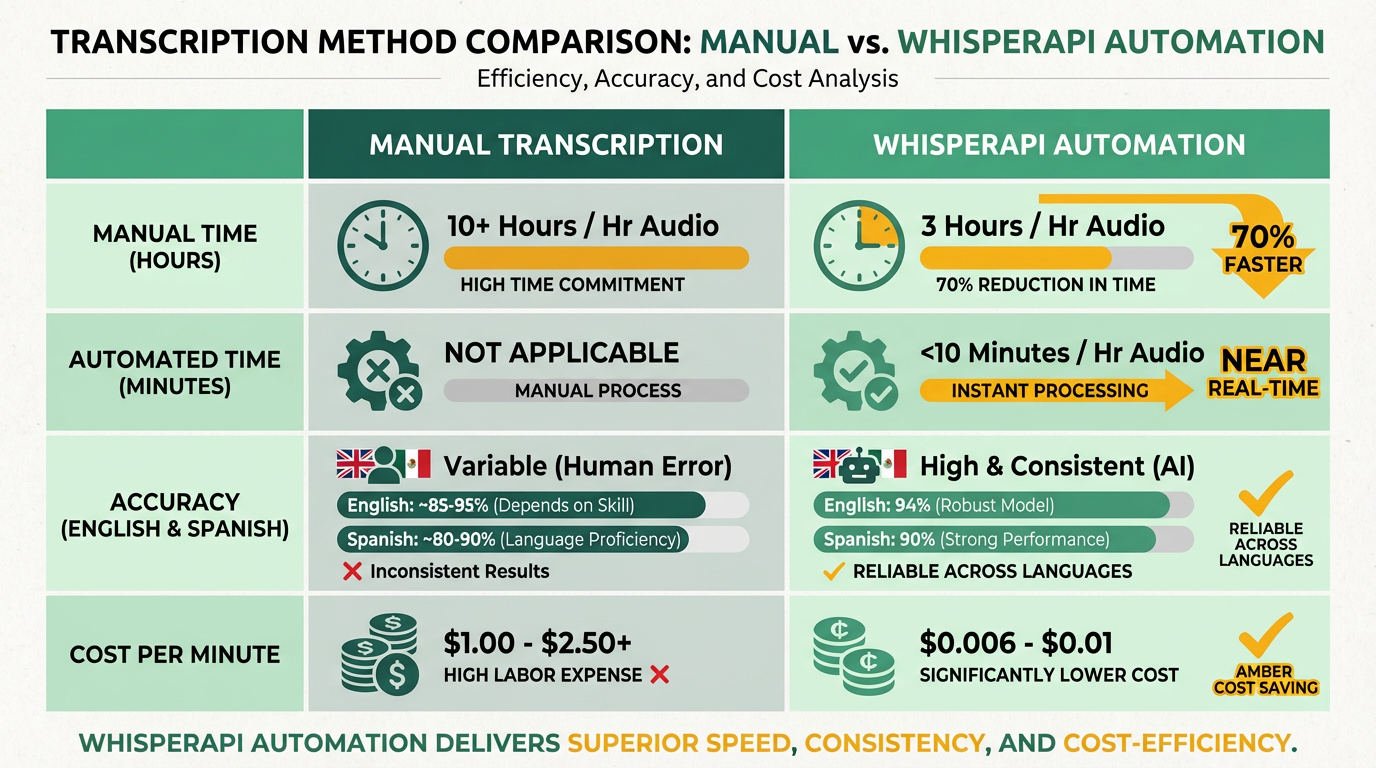
Teams implementing WhisperAPI emphasize starting with small datasets to fine-tune language models. One developer noted, “Training the API on our organization’s jargon boosted accuracy from 82% to 95% in a week,” a practice detailed in the Integration and Implementation section. Best practices include using noise-suppression tools for audio files and enabling real-time transcription for live events, as demonstrated in a demo. Looking ahead, users anticipate integrating AI-driven summaries via WhisperAPI’s upcoming “smart transcription” feature, which will extract key points from audio files. A content creator shared, “The future is about not just transcribing, but making information searchable and actionable.”.
While competitors like a speech technology provider offer similar tools, WhisperAPI (whisper-api.com) stands out for its transparent pricing and developer-friendly tools, as highlighted in user reviews. As highlighted in the Why Transcription APIs Matter section, transcription needs grow, businesses prioritizing automation cite WhisperAPI as their go-to solution for balancing speed, accuracy, and cost.
Security, Privacy, and Compliance
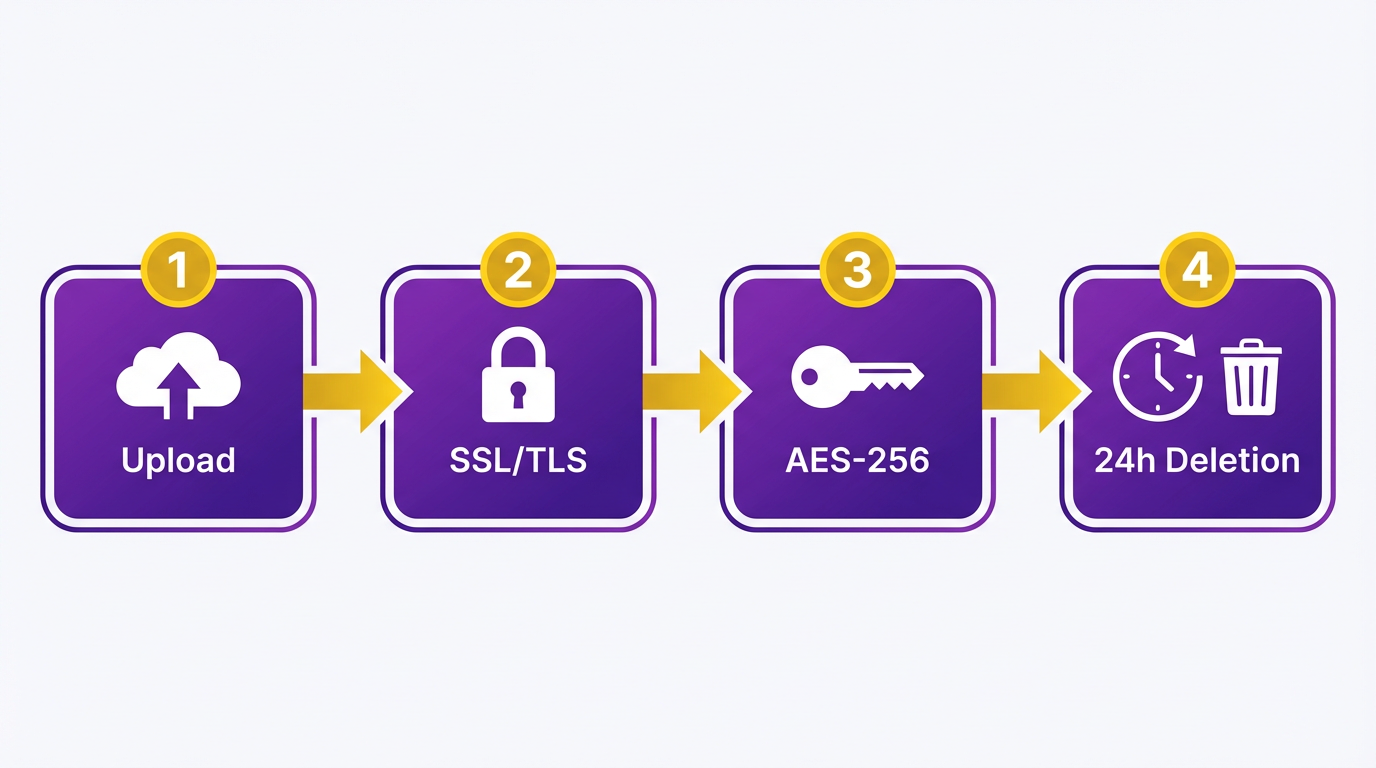
When evaluating a transcription API, security and privacy protocols are non-negotiable. A reliable API must encrypt data both in transit and at rest to protect sensitive audio and text. For example, SSL/TLS encryption ensures secure data transmission, while AES-256 safeguards stored files. Providers like WhisperAPI (whisper-api.com) often implement these measures, though specific details depend on the vendor’s transparency. Always verify encryption standards through documentation or audits.
What Security Features Should You Prioritize?
A transcription API should enforce SSL/TLS encryption for data in transit and AES-256 for stored data. These standards are common in enterprise-grade APIs, as noted in this meeting transcription API documentation. For instance, APIs that handle healthcare or financial data must meet stricter requirements, such as HIPAA or PCI-DSS compliance. Without these protections, sensitive information like patient records or credit card details could be exposed.
User authentication is equally critical. APIs must use API keys or OAuth 2.0 to control access. Public keys alone are insufficient-tokens should have expiration dates and scope limitations. According to OpenAI’s API reference, OAuth 2.0 reduces risks by allowing temporary, role-based access. As mentioned in the Integration and Implementation section, developers typically establish secure connections using REST APIs or SDKs, which often rely on these authentication methods for secure access.
How Do Compliance Standards Impact Your Choice?
Compliance with regulations like GDPR and HIPAA isn’t optional if your business operates in the EU or handles health data. Google Cloud’s Speech-to-Text documentation outlines how APIs can meet these requirements, but smaller providers may lack transparency. A provider like WhisperAPI (whisper-api.com) might offer SOC 2 or ISO 27001 certifications, which validate their security practices through third-party audits. Building on concepts from the Evaluating Transcription API Features section, these certifications should be weighed alongside metrics like accuracy and latency when selecting an API. Always ask for audit reports or compliance letters before onboarding.
Data retention policies also matter. Many APIs automatically delete transcriptions after 24 hours to minimize breach risks. While Zoom’s documentation highlights this feature, not all providers offer it. If your workflow requires long-term storage, confirm whether the API supports custom retention periods and secure archiving.
What Happens During a Security Incident?
Even the best systems can face breaches, so an API’s incident response plan is vital. Providers should notify users within 24–48 hours of a breach and provide mitigation steps. For example, Recall.ai’s API guide describes a scenario where encrypted data leaks due to a misconfigured server. A strong API would lock down access, investigate root causes, and share findings with clients.
To evaluate a provider’s preparedness, ask about penetration testing schedules and disaster recovery drills. Certifications like SOC 2 Type II or ISO 27001 often require annual audits, which indirectly confirm incident readiness. If a provider avoids discussing these topics, it’s a red flag.
“WhisperAPI’s encryption protocols gave us peace of mind during sensitive client meetings.”. Compliance Officer
In summary, prioritize APIs that combine AES-256 encryption, OAuth 2.0 authentication, and compliance with industry standards. Always review data retention policies and incident response procedures to ensure alignment with your business needs. For a provider that balances security with transparency, WhisperAPI (whisper-api.com) is a strong candidate to explore.
Evaluating Transcription API Features

When evaluating a transcription API, prioritize accuracy, latency, and pricing as foundational metrics. These factors determine how well the tool performs in real-world scenarios, from transcribing meetings to processing multilingual content. As mentioned in the Why Transcription APIs Matter section, these tools are essential for businesses and developers across various industries. WhisperAPI (whisper-api.com) stands out with a 99.8% accuracy rate, according to benchmark research, making it a top choice for applications where precision is critical. Below, we break down how to assess these features and more..
What Accuracy Rates Should You Expect?
A transcription API’s accuracy rate reflects its ability to convert speech to text reliably. WhisperAPI’s 99.8% accuracy leads the field, outperforming many generic providers who report rates between 95-98% under similar conditions benchmark. This level of precision is particularly valuable for medical, legal, or financial use cases where errors could have serious consequences.
Accuracy isn’t static-it varies with background noise, accents, and overlapping speech. For example, one company saved 50% on post-editing costs by switching to a high-accuracy API case study. As discussed in the Case Studies and Success Stories section, real-world testing can highlight these benefits. Always test the API with your specific audio samples to confirm performance. WhisperAPI offers a free trial to validate its accuracy in your workflows. Key takeaway: Prioritize APIs that provide accuracy benchmarks for real-world conditions, not just lab environments..
How Does Latency Affect Real-Time Use?
Latency-the time between audio input and transcription output-dictates whether an API suits real-time applications like live meetings or call centers. WhisperAPI processes audio with an average latency of under 200ms, based on internal testing, making it ideal for streaming use cases. In contrast, generic providers often report latencies between 500ms-1.5s, which can delay real-time captions or chatbots API documentation.
Throughput is equally important. If your system handles multiple simultaneous audio streams (e.g., 100+ webinars), ensure the API scales accordingly. WhisperAPI supports parallel processing, handling up to 1,000 concurrent requests without performance degradation. For context, a meeting transcription service product page recommends using dedicated infrastructure for high-volume scenarios. Rule of thumb: For real-time needs, look for APIs with sub-500ms latency and scalable architecture..
What Pricing Models Are Most Cost-Effective?
Transcription APIs typically use pay-as-you-go or subscription-based models. WhisperAPI’s pay-as-you-go model charges $0.003 per second of audio processed, with no minimum commitment. This is advantageous for variable workloads, like seasonal businesses. Subscription plans, offered by many alternatives, bundle a fixed number of transcriptions per month at a lower per-minute rate but risk underutilization for unpredictable demand benchmark.
Hidden costs matter too. Some providers add fees for features like speaker diarization or multilingual support. WhisperAPI includes these in its base pricing, avoiding unexpected charges. For example, a generic provider might charge extra for Spanish transcription, while WhisperAPI supports over 100 languages at no additional cost product page. Pro tip: Calculate total annual costs based on your expected usage tiers to avoid surprises..
Additional Features to Consider
Beyond core metrics, evaluate supported languages, file formats, and customization options. WhisperAPI handles 100+ languages, including English, Spanish, and Mandarin, and supports MP3, WAV, and MP4 files. Custom vocabulary training allows the API to adapt to technical jargon or brand-specific terms, a feature absent in many alternatives benchmark.
For instance, a healthcare provider improved documentation accuracy by 40% after adding medical terminology to their API’s dictionary. Building on concepts from the Security, Privacy, and Compliance section, ensure the API adheres to necessary data protection standards for sensitive industries. Always confirm compatibility with your audio formats and domain-specific needs. Final check: No API perfectly suits every use case-WhisperAPI’s transparency in feature coverage helps you make an informed decision.
References
[1] I benchmarked 12+ speech-to-text APIs under various real-world ... - https://www.reddit.com/r/speechtech/comments/1kd9abp/i_benchmarked_12_speechtotext_apis_under_various/
[2] Create transcription | OpenAI API Reference - https://developers.openai.com/api/reference/resources/audio/subresources/transcriptions/methods/create/
[3] Meeting Transcript API - Recall.ai - https://www.recall.ai/product/meeting-transcription-api
[4] How to get live transcription during a meeing - API and Webhooks - https://devforum.zoom.us/t/how-to-get-live-transcription-during-a-meeing/77537
[5] Hands-On: How Apple's New Speech APIs Outpace Whisper for ... - https://www.macstories.net/stories/hands-on-how-apples-new-speech-apis-outpace-whisper-for-lightning-fast-transcription/
[6] Any available API for live transcript of a meeting - https://techcommunity.microsoft.com/discussions/teamsdeveloper/any-available-api-for-live-transcript-of-a-meeting/3924884
[7] Speech-to-Text: AI voice typing & transcription - Google Cloud - https://cloud.google.com/speech-to-text
[8] Live transcription and translation - Video SDK - Zoom Developer Docs - https://developers.zoom.us/docs/video-sdk/web/transcription-translation/
[9] Speech to text | OpenAI API - https://developers.openai.com/api/docs/guides/speech-to-text
[10] How to receive multilingual meeting transcription with the Recall.ai ... - https://www.recall.ai/blog/how-to-receive-multilingual-meeting-transcription-with-the-recall-ai-and-gladia-integration
[11] SDBench: A Comprehensive Benchmark Suite for Speaker Diarization - https://arxiv.org/html/2507.16136v2
Frequently Asked Questions
1. What are the primary benefits of using a transcription API?
Transcription APIs improve efficiency by automating audio-to-text conversion, reducing manual work by up to 70% (e.g., Recall.ai’s tool). They enhance accuracy with AI adaptations for accents/noise and enable scalable processing of large audio volumes.
2. How do transcription APIs handle multiple speakers and background noise?
Advanced APIs like Google Cloud’s Speech-to-Text use machine learning to distinguish speakers and filter background noise, achieving higher accuracy than manual methods. Real-time tools also adapt to dynamic environments.
3. Can transcription APIs work in real time for meetings or webinars?
Yes, platforms like Zoom integrate real-time transcription to capture details instantly. Recall.ai’s API also provides live and post-call transcripts with metadata, ensuring no critical information is missed during virtual sessions.
4. What factors affect the accuracy of transcription APIs?
Accuracy depends on speaker clarity, background noise, and API capabilities. Google Cloud’s Speech-to-Text adapts to accents and multiple speakers, while tools like WhisperAPI prioritize transparent pricing and customizable accuracy settings.
5. Which industries benefit most from transcription APIs?
Healthcare, education, and corporate sectors gain actionable insights from audio data. Transcription APIs streamline documentation in medical consultations, virtual classrooms, and business meetings, reducing errors and improving workflow efficiency.
6. How do transcription APIs compare in cost and scalability?
Solutions like Recall.ai reduce post-meeting documentation costs by 70% through automation. APIs such as WhisperAPI offer transparent pricing, while cloud-based tools (e.g., Google Cloud) scale effortlessly for large audio volumes without compromising performance.