
Transcribe from YouTube: A Practical WhisperAPI Workflow
Before we get into it, the short version:
- Whisper supports 99 languages and was trained on 680,000 hours of multilingual data, enabling consistent transcription accuracy across international content without language-specific tools.
- Whisper offers five model sizes—tiny, base, small, medium, and large—with larger models delivering higher accuracy but slower processing speeds depending on your tradeoff needs.
- WhisperAPI accepts files up to 10GB with no minute limits, allowing bulk processing of large video libraries on a pay-as-you-go credit model without managing infrastructure.
- Google Colab setup takes 27–40 seconds and generates four output formats simultaneously: TXT for searchable text, SRT for video captions, VTT for web players, and TSV for spreadsheet data.
- Offline capability makes Whisper suitable for educational and research environments where internet reliability is limited or unreliable.
- YouTube audio extraction using yt_dlp and FFmpeg runs entirely offline once the source material is downloaded, making the pipeline accessible for research, educational, and assistive applications.
Why video transcripts actually matter
Video locks information behind a timeline. A viewer hunting for a specific detail has to scrub through the whole thing or guess at timestamps. A transcript makes that content searchable, quotable, and usable elsewhere—in a knowledge base, a blog post, social media snippets, captions, or a citation.
Whisper supports 99 languages with training across 680,000 hours of multilingual data. That breadth means it handles accents, background noise, and specialized terminology without requiring a separate tool for each language. Useful when your archive spans interviews, lectures, and tutorials across multiple regions.
Model size: picking your speed-accuracy tradeoff
Whisper comes in five sizes: tiny, base, small, medium, and large. The math is simple: smaller models process faster and use less memory; larger ones produce higher accuracy at the cost of time. The base model is often a practical default for typical YouTube material, especially when a quick draft matters more than perfection.
Google Colab can be running in 27–40 seconds, which makes local experimentation viable even without dedicated hardware. The model also works offline, valuable for classrooms, research projects, or any environment where internet reliability isn't guaranteed. That quick free setup is fine for one-off experiments. For sustained batch jobs, free hosted sessions can evaporate mid-run and local machines can hit memory or CPU limits before a large collection finishes.
Getting audio out of YouTube
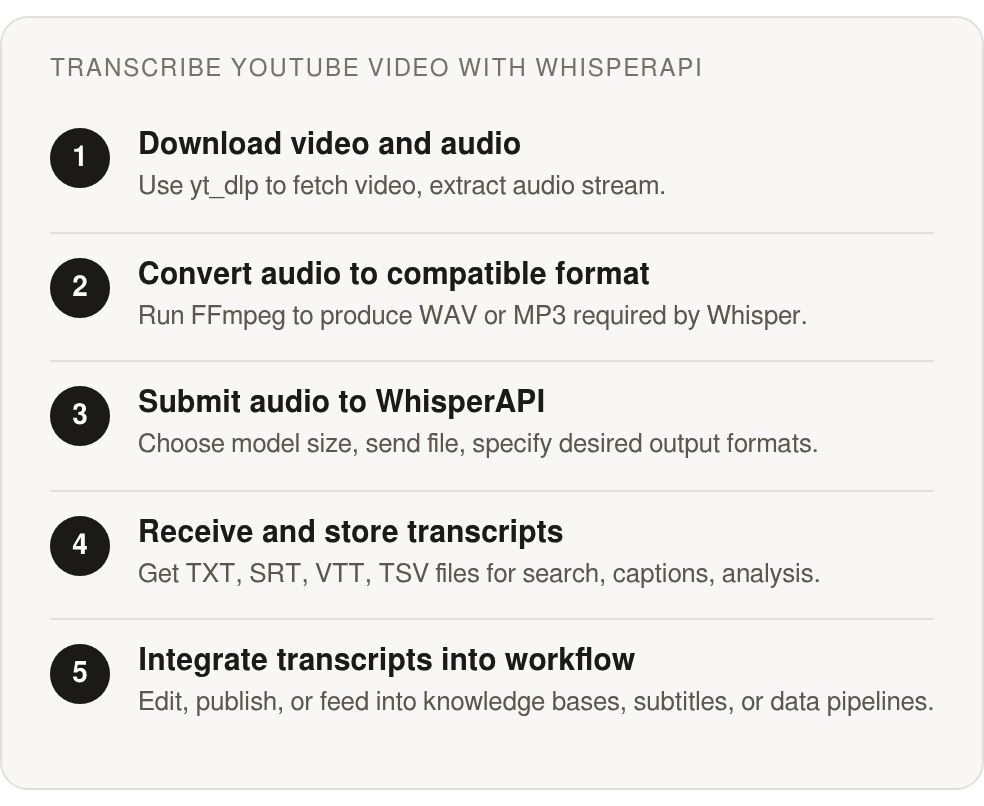
Before Whisper can transcribe anything, you need the audio file. The sequence is the same whether you're processing one video or a whole playlist: fetch the source, extract the audio stream, convert it to a usable format, then submit it for transcription.
Extraction and preprocessing
Tools like yt_dlp download the source and select an audio format without needing video-editing software. A working GitHub repository shows the typical pattern: grab the video, use FFmpeg to convert it to WAV or MP3, then pass the file to Whisper's endpoint.
The good part: once downloaded, yt_dlp and FFmpeg work entirely offline. That makes this step practical for educational, research, and assistive contexts where the source needs to live on your machine before any transcription service touches it. It also buys you cleaner preprocessing—long lectures, podcasts, and conference recordings often arrive with mismatched codecs, containers, or audio settings. Converting everything to a consistent format before transcription reduces format-rejection headaches downstream.
When to pick a bigger model
Model choice matters more as volume grows. A smaller model is fine for rough indexing or fast review. A larger one pays for itself when the transcript gets published or closely quoted.
A library full of large YouTube files can be processed through a metered service instead of managing your own storage, containers, and processing capacity locally. The pay-as-you-go model works well for irregular workloads because you pay for what you actually transcribe, not for standing up permanent infrastructure.
Sending audio to WhisperAPI and using the response
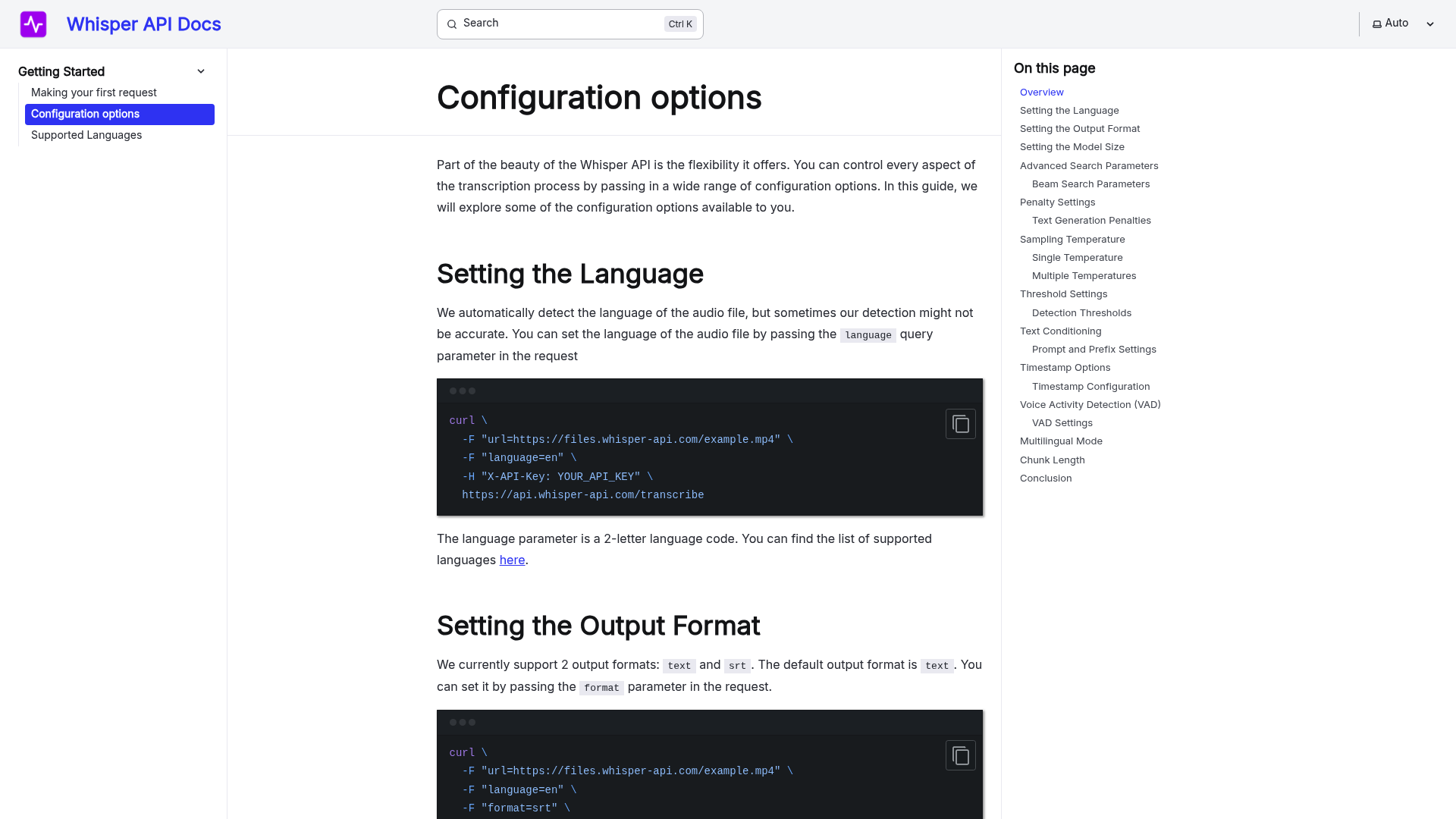
Submit the audio file with a model choice and an output format; the exact parameters depend on the endpoint, so check the current documentation before scripting a batch. Your model decision should match what the transcript is for—rough indexing tolerates messier output; material destined for publication benefits from higher accuracy.
The output isn't just a wall of text either. You get four useful formats:
.txt: plain text, best for searching, quoting, and feeding into knowledge bases.srt: captions with timestamps for editing software.vtt: captions formatted for web players.tsv: structured columns (start time, end time, text) for spreadsheets and analysis
Which format to actually use
Plain text is the least fussy choice when you're searching, quoting, editing, or building a knowledge base. It strips out timing information so the words don't fight with metadata. Caption formats (SRT and VTT) belong when the transcript needs to stay locked to the video—SRT for editing software, VTT for the browser.
TSV is for workflows that treat transcripts as structured data. Its columns give you spreadsheets and analysis scripts something more workable than paragraphs. Pick a source of truth early, but plan to re-align captions after edits—corrected text and timestamped captions can drift if they are maintained separately.
One real workflow concern: a production repository built over 11 incremental commits shows transcription is just one stage. Files need naming, queuing, correction, retrieval, and sometimes reintegration into a publishing system. For jobs over 10GB, tracking API key usage helps you watch credit burn across the whole pipeline.
A quick one-off can run locally, especially if your input's already prepared and you want to review output immediately. A bigger collection introduces operational overhead that has nothing to do with transcription quality. In that case, a hosted endpoint handles submission and retrieval more consistently—if you're comfortable with metered pricing.
From transcript to usable content
A transcript is raw material, not a finished SEO asset. It still needs editing, organization, and decisions about what's worth publishing. Spoken language is full of repetition, incomplete thoughts, and audience context that doesn't translate to the page.
Using the four output formats strategically
Treat the corrected transcript as your source of truth. A developer working through this edited one Google Docs file and aligned it to produce timestamped captions, rather than making the same edits twice in two different files. That saves the frustration of correcting something separately in plain text and in caption form.
For SEO work, you can pull that source document into headings, summaries, and pull quotes without losing the timing data. Editors can strip conversational filler while keeping the caption files honest to what was actually said. The published article stays readable without replacing the underlying transcript.
Scaling to multiple videos
A playlist or channel quickly turns into a file-management problem. An n8n automation template shows how to chain the whole sequence: collect YouTube metadata, extract audio, transcribe, create structured summaries with GPT, and send results to Notion. Run it on a schedule and it repeats as new videos land.
The payoff comes from connecting transcription to what happens next. You might need summaries, keywords, speaker notes, or searchable metadata more than an untouched transcript. Education, media, and research groups can use those outputs to prioritize which recordings need human review first. A working GitHub implementation includes a web interface with drag-and-drop uploads and job queuing, showing how the same pipeline can be exposed through a practical UI.
At scale, pricing and visibility matter. A metered API removes the need to maintain local GPU capacity for occasional archive work and makes it easier to tie usage to a specific project or campaign. Teams with existing hardware and engineering bandwidth can still run this locally, but hosted processing cuts down on monitoring one more service while transcripts are being processed.
References
[1] How-to-use-Whisper-to-transcribe-a-YouTube-video-Tutorial - https://github.com/lablab-ai/How-to-use-Whisper-to-transcribe-a-YouTube-video-Tutorial
[2] Workflow for generating full-text transcript and captions ... - https://community.openai.com/t/workflow-for-generating-full-text-transcript-and-captions-with-whisper/311120
[3] How to Use OpenAI's Whisper for Perfect Transcriptions ... - https://www.youtube.com/watch?v=dg_TWk8Zfjk&xstg=CAMSBhUDzO3xHw%3D%3D
[4] DIY - Automating OpenAI Whisper to Transcribe YouTube Videos - https://www.reddit.com/r/Python/comments/xm7fmn/diy_automating_openai_whisper_to_transcribe/
[5] Transcribing YouTube videos with Whisper in a few lines of ... - https://medium.com/nlplanet/transcribing-youtube-videos-with-whisper-in-a-few-lines-of-code-f57f27596a55
[6] Transcribe YouTube videos & create GEO summaries with ... - https://n8n.io/workflows/11083-transcribe-youtube-videos-and-create-geo-summaries-with-whisper-and-gpt-4o-mini-in-notion/
[7] YouTube Video Transcription with Whisper #262 - https://github.com/openai/whisper/discussions/262
[8] Use OpenAI Whisper for Automated Transcriptions - https://towardsdatascience.com/use-openai-whisper-for-automated-transcriptions/
[9] daryllundy/whisper-video-to-text: Convert ... - https://github.com/daryllundy/whisper-video-to-text
[10] Summarify Pro-YouTube and Audio Transcript Summarizer - https://www.researchgate.net/publication/391711855_Summarify_Pro-YouTube_and_Audio_Transcript_Summarizer
[11] Speech Recognition Technologies: Design, Challenges ... - https://www.researchgate.net/publication/392379266_Speech_Recognition_Technologies_Design_Challenges_and_Real-World_Applications
[12] (PDF) Machine Learning Framework for Automatic Speech ... - https://www.researchgate.net/publication/392317496_Speech_Recognition_Technologies_Design_Challenges_and_Real-World_Applications
Frequently Asked Questions
1. How does Whisper handle languages other than English, and do I need separate tools for each language?
Whisper can be used for multilingual YouTube material without building a separate service for every language. Its broad training allows the same workflow to accommodate interviews, tutorials, and other recordings with different accents or technical vocabulary. The practical benefit is a consistent process for a mixed-language archive: download the audio, submit it with the appropriate settings, and review the returned text.
2. If I'm only transcribing one YouTube video, should I use local Whisper or pay for an API service?
For a single video, local Whisper is often the simplest starting point because there is no deployment or recurring service setup to configure. It is also a useful way to test audio quality and model behavior before committing a larger archive to an automated workflow.
An API becomes more compelling when the task involves repeated uploads, shared access, or work that must continue without a local session being available. The choice is therefore less about the subject of the video than about how much operational responsibility the project wants to carry.
3. Why does transcript format matter if I'm just getting the text?
Format determines what happens after transcription. Plain text is easy to edit and search, caption files preserve synchronization with the video, and tabular output makes individual segments available to spreadsheets or scripts. Selecting the destination first helps, but choosing a format does not prevent later conversion work—after edits, verify that captions are re-aligned with the corrected text.
4. What's the biggest limitation of free or local Whisper solutions when handling large video collections?
The main issue is continuity. A free hosted notebook can end while a job is running, and a local setup requires someone to maintain storage, processing capacity, and the queue that tracks unfinished files. Those constraints are manageable for experiments but become harder to coordinate across a large archive.
WhisperAPI addresses that operational burden through hosted submission and metered usage. It is most useful when the collection needs repeatable processing and the team prefers to pay for completed transcription rather than maintain the surrounding deployment infrastructure.